Goal · Memory
The app that makes you play a memory game before you scroll
Sorry Scroll (sorryscroll.com) blocks Instagram, TikTok or any app you choose and asks for one short memory game first: a few highlighted tiles, a string of digits, or a set of objects to remember and then recall. Get it right and the app unlocks for 15 to 60 minutes. Each game has five levels: it gets harder after three right in a row and easier after two misses.
The short answer
Each step
One of three games, picked for you: Pattern Recall, Number Recall or What's Missing?
Time
1 second to get ready, 3 s to 7.5 s to look, then no clock while you answer.
Difficulty
5 levels per game. Up after 3 right first try in a row, down after 2 misses in a row.
Goal
300 memory workouts, plus an optional weekly target of 5, 15 or 30.
Price
Free for 1 blocked app, every game included.
What a step looks like
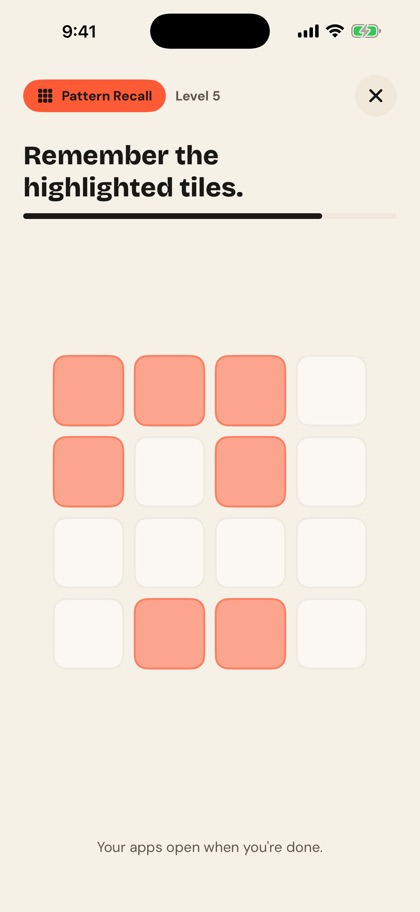
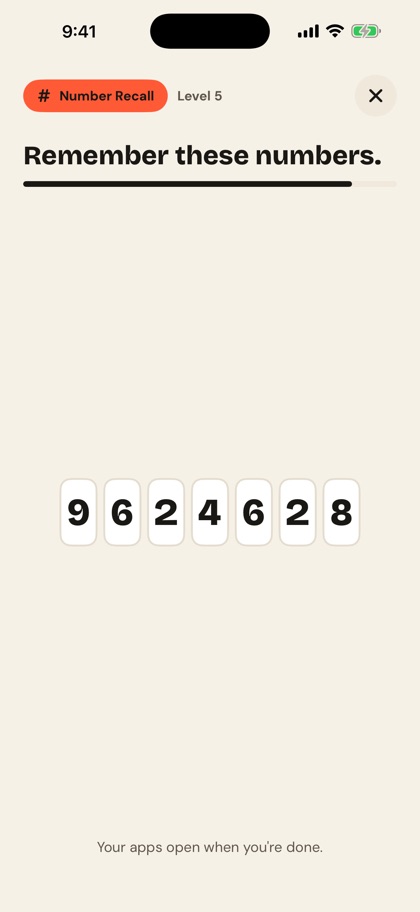
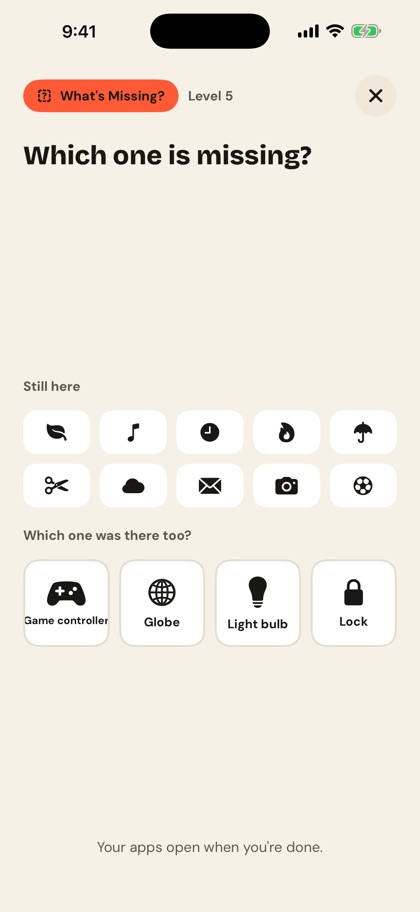
- You open a blocked app. The Sorry Scroll shield appears. Pay the step, use one of your 3 daily skips, or close the app.
- The app picks a game. Any of the three except the one you played last time, so you never get the same game twice in a row. There's no menu to choose from.
- Get ready, then look. A one-second "Get ready", then the thing to remember appears with a thin bar showing how long you have: 3 s to 7.5 s, depending on the game and level.
- It hides. You recall it. Tap the tiles, type the digits, or pick the missing object. There's no timer on answering, and the clocks pause if you leave the app, for example to take a call.
- The app opens. Get it right and your blocked apps open for the time you chose, 15 to 60 minutes. Then the block comes back on its own.
The three games, level by level
Pattern Recall
Some tiles on a grid light up, then go blank. Tap the ones that were lit, in any order. A counter shows how many you've picked ("2 of 3 picked"); tap a tile again to unpick it.
It checks itself as soon as you've picked as many tiles as were lit. Levels 1 and 2 use a 3×3 grid with 3 and 4 tiles; levels 3 to 5 use a 4×4 grid with 5, 6 and 7.
Number Recall
A row of digits appears, then hides. Type them back in order on the keypad, with a delete key for slips. It checks itself when the last digit goes in.
Level 1 is 3 digits and each level adds one, up to 7. The app never shows a digit three times running or a sequence with one fixed step, like 1234, 8642 or 5555, because those are remembered as a rule, not as numbers.
What's Missing?
A set of everyday objects appears, each with its name: a key, a bicycle, an umbrella. Then the set comes back with one gone, and the rest reshuffled, so you have to remember it rather than spot a gap.
Pick the missing one from 3 choices (4 from level 3). The wrong choices are objects that weren't shown, so exactly one answer is right. The objects come from a list of 38, picked to look clearly different from each other.
The full level table, straight from the app's code. The time is how long the thing to remember stays on screen:
| Level | Pattern | Numbers | Missing |
|---|---|---|---|
| 1 | 3 tiles 3×3 grid 3 s | 3 digits 3 s | 3 objects 3 choices 3.5 s |
| 2 | 4 tiles 3×3 grid 3 s | 4 digits 3.5 s | 5 objects 3 choices 4.5 s |
| 3 | 5 tiles 4×4 grid 3.5 s | 5 digits 4 s | 7 objects 4 choices 5.5 s |
| 4 | 6 tiles 4×4 grid 3.5 s | 6 digits 4.5 s | 9 objects 4 choices 6.5 s |
| 5 | 7 tiles 4×4 grid 4 s | 7 digits 5 s | 11 objects 4 choices 7.5 s |
How the difficulty adapts
- Everyone starts at level 1. No placement test and no questions about you. Each game has its own level, so a strong Number Recall doesn't make Pattern Recall harder.
- Only first attempts count. Getting an easier retry right doesn't move you up. A miss followed by closing the step still counts as a miss.
- 3 right first try in a row: up one level. The run starts again from zero at the new level.
- 2 first-try misses in a row: down one level. Again the count resets, so one bad moment doesn't send you tumbling.
- Levels stay between 1 and 5. At level 5 more right answers keep you there; at level 1 a miss keeps you at level 1.
If you get one wrong
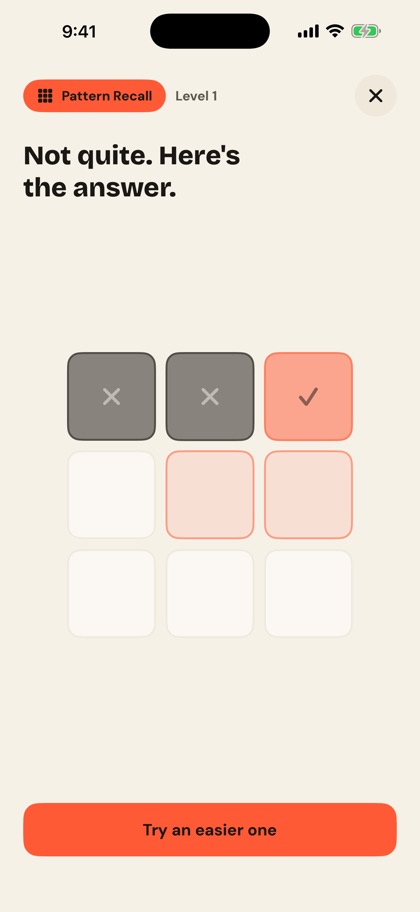
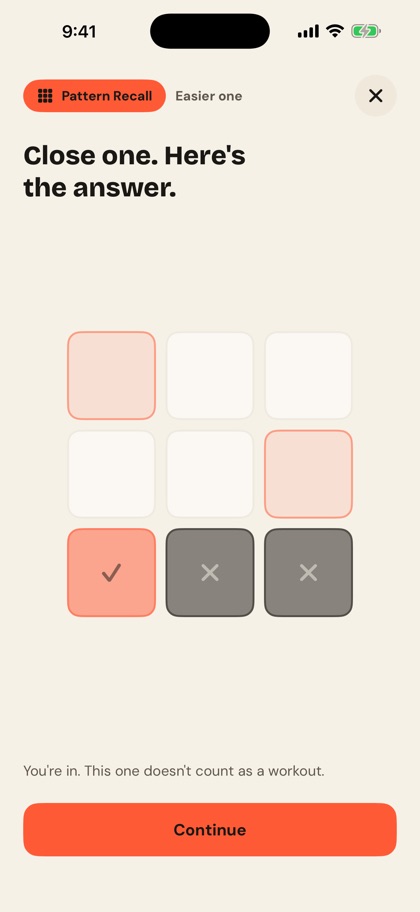
- First miss: see the answer. Pattern Recall marks the tiles you got right and crosses out the wrong ones; Number Recall shows what the digits were; What's Missing? highlights the right object.
- Then try an easier one. Same game, one level lower (or level 1 again if you're already there), with a new puzzle. Get it right and it counts as a workout.
- Second miss: you're in anyway. The app shows the answer and says "You're in. This one doesn't count as a workout." Continue opens your apps.
A step that ends this way earns no workout, doesn't move your finish date and can't set a personal best. It also doesn't use one of your skips. The point is that a hard puzzle never leaves you stuck outside an app.
300 workouts and a weekly target
Every challenge you finish counts as one memory workout, whether you got it first try or on the easier retry. The goal's finish line is 300 workouts. Like the other goals, the app estimates a finish date from your pace, shows it on Home and after each step ("Your scrolling just moved your goal 2 days closer"), and shows a goal-complete screen when you reach 300.
On top of that there's an optional weekly target, a lighter rhythm for the week. You choose it on the Memory card when you pick the goal; there's no extra setup screen.
| Weekly target | Challenges | 300 at exactly that pace |
|---|---|---|
| Casual | 5 a week | about 60 weeks |
| Regular (default) | 15 a week | about 20 weeks |
| Frequent | 30 a week | about 10 weeks |
- Change it or turn it off in Settings, under Weekly target: 5, 15 or 30 a week, or No target.
- The week is your phone's calendar week, in your time zone.
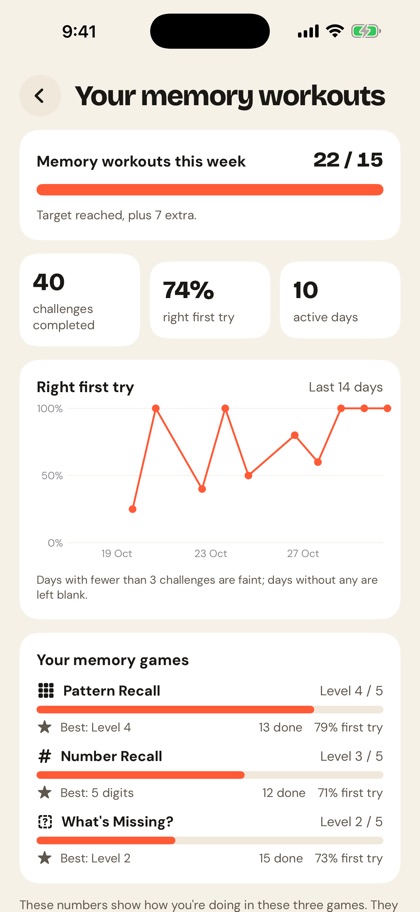
- The bar stops at full. Extra workouts show as a note, like "Target reached, plus 7 extra." Hitting the target doesn't stop the challenges.
The progress screen
Home shows the goal card (workouts out of 300 and the finish date), the weekly card, and a "Your memory workouts" row that opens the full screen:
- This week: workouts against your target, as a bar.
- Three numbers: challenges completed, the share you got right first try, and how many days you've played.
- Right first try, last 14 days: a line chart. Only days with 3 or more challenges join the line; days with 1 or 2 are faint dots, and days with none stay blank. Until you have 3 such days there's no chart, just "Your trend appears once you've done 3 or more on 3 different days", so a couple of lucky tries never look like a trend.
- Each game: its level out of 5 as a bar, its personal best, how many you've done and the share right first try. The best is the highest level solved for Pattern Recall and What's Missing?, and the longest sequence for Number Recall ("Best: 5 digits").
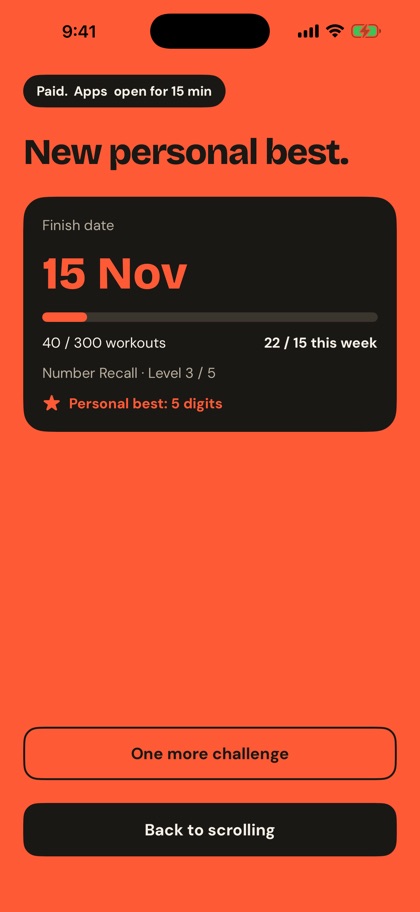
After each step, the unlocked screen shows the game you played and its level, your workouts this week and any new personal best.
What the research says about brain training
Brain-training apps have made big promises, so it's worth being clear about what the evidence shows. In 2016 a team of researchers led by the psychologist Daniel Simons reviewed the studies that brain-training companies cite (Simons et al., Psychological Science in the Public Interest). They found plenty of evidence that training improves performance on the trained tasks, less evidence that it helps with closely related tasks, and little evidence that it helps with distantly related tasks or everyday thinking.
In plain terms: practise Number Recall and you'll likely get better at Number Recall. That is what the progress screen tracks, and all it tracks. Sorry Scroll doesn't claim the games improve your memory, focus or intelligence, and the levels aren't a score of any of those.
So why have it? Some people want the pause before a scroll to be a small puzzle rather than a lesson or a move. It needs no sound, no space and no setup, and you can watch yourself get better at the games. If you want the step to build something outside the app, the language goal teaches 500 words per language and the Body & mind goal adds up active minutes.
Switching goals keeps your progress
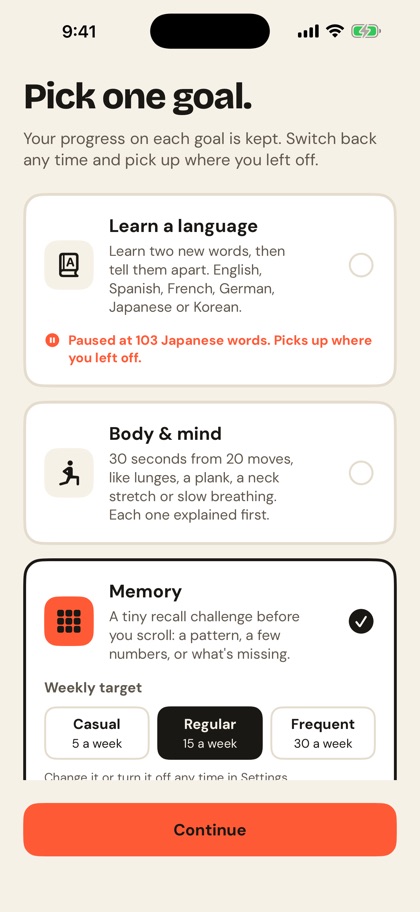
Goals pause instead of resetting. Switch from Memory to a language, or the other way, in Settings under Goal, and the one you leave is saved where it stopped. The goal picker shows it ("Paused at 40 workouts. Picks up where you left off.") and picking it again carries on from there.
- Your memory levels, results and personal bests are kept through any goal change, even while you're on another goal.
- Your other goals keep their progress too: each language's words and review dates, and your active minutes.
- A finished goal starts a new round when you pick it again.
Free or Pro
Free
Block the one app you choose, with all three memory games, every level, the weekly target and the full progress screen. Also every language and every move, 3 skips a day and your live finish date.
Pro
Block every app, plus whole categories on iPhone, and get a daily receipt of what your scrolling paid for. $39.99 a year with a 3-day free trial, or $4.99 a week. In India, ₹1,999 a year or ₹199 a week.
Good to know
- It works offline. Every challenge is made and checked on your phone; nothing loads from the internet during a step.
- Your levels and results are stored on your phone. No account is needed. If you make one, it backs up your goal and progress count, not your levels or results. The app's anonymous usage counts note how a challenge went (game, level, tries, seconds), never the tiles, digits or objects. Details: the privacy policy.
- Skips work as before. 3 a day. The close button on a step leaves the app blocked.
- Screen readers: Number Recall and What's Missing? are built to work with VoiceOver. Pattern Recall tiles are labelled by row and column, but the game is visual by nature. Reduce Motion is respected.
- Which version: Memory comes with Sorry Scroll 1.0.5 on iPhone and 1.0.2 on Android. If the goal picker shows only two goals, update the app.
Sorry Scroll
Make your next scroll pay for a memory workout
Pick Memory, block the app you open most, and every open starts with one short game. Workouts count toward 300, and the progress screen shows how you're doing in each game.
Free for one app, every game included.
Questions
Questions
Is there an app that makes you play a memory game before opening social media?
Yes. Sorry Scroll's Memory goal puts one short recall game in front of Instagram, TikTok or any app you block: Pattern Recall, Number Recall or What's Missing?. Get it right and the app opens for 15 to 60 minutes. Free for one app.
Will it improve my memory?
Sorry Scroll doesn't claim that. Research reviewing brain-training studies (Simons et al., 2016) found that practice mostly improves the practised game, with little evidence it carries over to everyday thinking. The progress screen tracks how you do in these three games, nothing more.
What happens if I can't remember it?
After a first miss you see the answer and get an easier one in the same game. After a second miss the app lets you in anyway. That step counts no workout, but it doesn't use a skip either.
How long does a challenge take?
One second to get ready, then 3 s to 7.5 s to look, depending on the game and level. There's no timer on answering.
Can I choose which game I get?
No. The app picks one for you and never repeats the game you just played.
How does it decide how hard to make it?
Each game has its own level from 1 to 5, starting at 1. Three right first try in a row moves that game up a level; two first-try misses in a row moves it down.
What happens to my memory progress if I switch to a language?
It's kept. The Memory goal pauses where it stopped, and your levels and personal bests stay. Pick Memory again and you carry on.
Does it work offline?
Yes. Challenges are generated and checked on your phone, and your levels and results are stored there.
Is it free?
The free plan blocks one app and includes all three memory games, every language and every move. Pro blocks every app for $39.99 a year (3-day trial) or $4.99 a week.
Sources
Every fact on this page comes from these official pages, checked on 31 October 2026.