How it works
How Sorry Scroll works
You pick a goal and the apps to block. When you open one, Sorry Scroll's shield asks for a 30-second step toward your goal: five quick language cards, or one guided move. Do it and the app opens for the 15 to 60 minutes you chose; skip it (3 times a day); or close the app. Then the block comes back on its own.
1. Set it up once
- Pick one goal. A language (English, Spanish, French, German, Japanese or Korean, with meanings in seven languages) or an active body (seven moves and breathing).
- Pick the apps that owe you. The free plan blocks one app you tick; Pro blocks every app you pick and whole categories, like Social. On iPhone you can add websites too, such as instagram.com.
- Choose how long each unlock lasts: 15 to 60 minutes, in 5-minute steps.
2. Open a blocked app
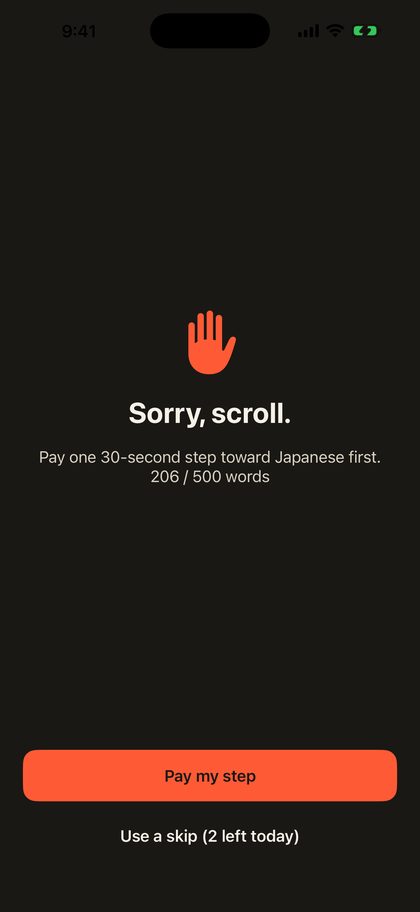 The shield. Pay one 30-second step, use a skip (3 a day, back at midnight), or close the app.
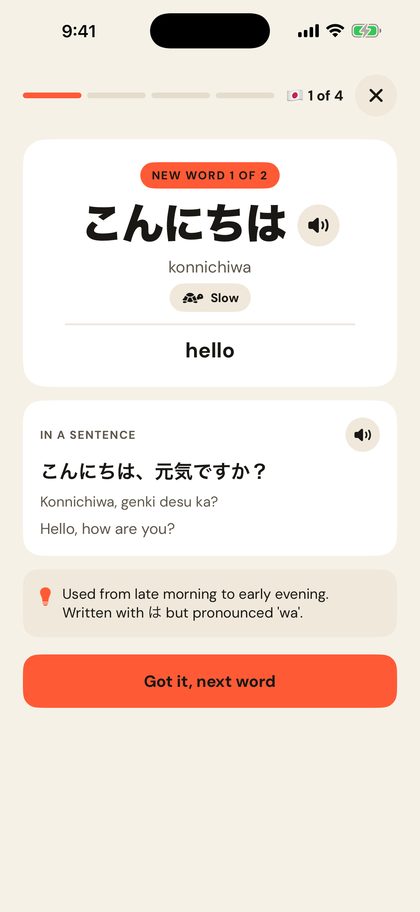 A language step: 5 cards. Two new words, then a check on each (the other new word is one of the wrong answers, so you learn to tell them apart), then one older word to recall.
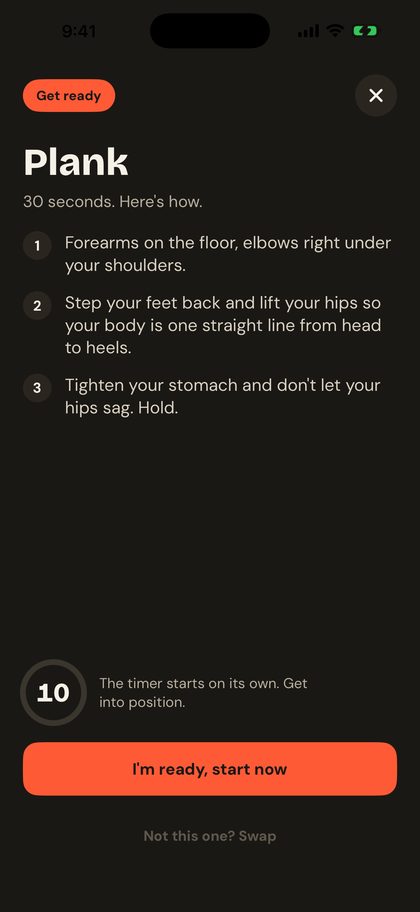 Or a move. Explained in three short steps, 10 seconds to get into position, then the timer. Swap it if it doesn't suit where you are.
3. The app opens, then the block comes back
Finish the step and your blocked apps open for the time you chose. When it runs out, the shield is back on its own; there's nothing to turn on again.
4. Watch it add up
- Language: every word goes into Your words. A word counts as learned after 2 correct recalls; it comes back 20 minutes after the first, then after 1, 3, 7 and 21 days. New words stop at 12 a day, after which steps become reviews of 3 words. Easily confused words are taught side by side.
- Active body: each move adds its seconds toward 500 active minutes.
- Pro adds your finish date and a daily and weekly receipt of what your scrolling paid for.
iPhone and Android
| iPhone | Android | |
|---|---|---|
| How it blocks | Apple's Screen Time | Usage access (sees which app is open) and Display over other apps (shows the shield) |
| What it can block | Apps, categories (Pro) and websites | Apps |
| Can it see what you do in an app? | No. Apple doesn't even tell it the names of the apps you block | It sees which app is open and for how long, on your phone only |
| Optional sign-in | Sign in with Apple | Sign in with Google |
| Requires | iOS 17 or later | Android 8 or later (in Google Play review) |
Privacy, in short
Which apps you block, your steps, skips, words and moves are stored on your phone. No camera, no microphone, no ads. The app counts how it's used (screens seen, steps, skips, purchases) with an anonymous ID, and an account, if you make one, backs up your goal and progress. The full version is the privacy policy.
Questions
What happens after the 12 new words a day?
Steps keep coming, but they become reviews: three words you've already met, picked by what's due. New words start again the next day.
Does it unlock every blocked app, or just the one I opened?
Paying a step opens your blocked apps for the unlock length you set, so switching from Instagram to TikTok doesn't cost a second step inside that window.
Can I change which app the free plan blocks?
Yes, any time: open Blocked apps, tick a different one. Pro blocks every app you pick, and whole categories such as Social.
How do I turn it off?
On iPhone, remove its access in Settings › Screen Time. On Android, turn off Usage access or Display over other apps in Settings › Apps › Special app access. Or just delete the app.
Does it need the internet?
No for the steps: the words, sentences and audio come with the app. An internet connection is only used for the optional account backup, purchases and anonymous usage counts.
Does it work on iPad?
Yes, it runs on iPad with the same Screen Time blocking.