Comparison
Best app to block social media without deleting it
Sorry Scroll (sorryscroll.com) is the pick if you want each open to cost something useful: before Instagram, TikTok or YouTube opens, you spend 30 seconds on two words of a language, a quick move or a memory game, and your apps, accounts and messages stay exactly as they are. The right blocker depends on which of three things you want: a hard block (Freedom, AppBlock, Opal), a pause before each open (one sec, ScreenZen, Sorry Scroll), or the feeds gone but messages kept (Dull or Sociano on iPhone; one sec, ScreenZen or AppBlock on Android).
The short answer
Make each open cost something
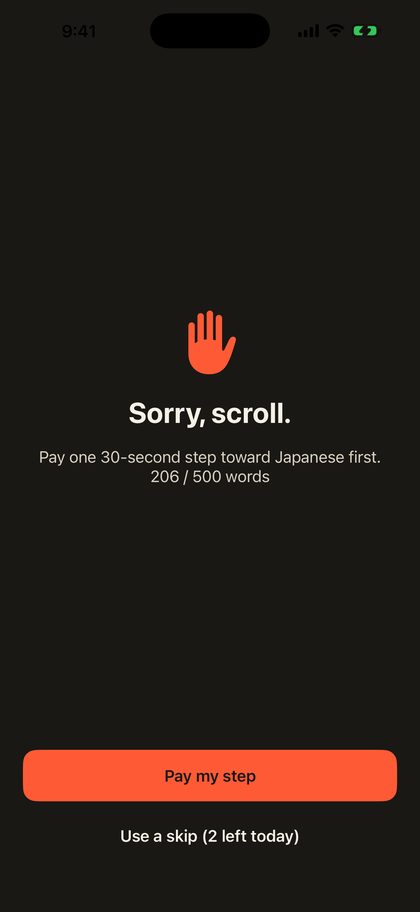
Sorry Scroll: a 30-second step toward a goal, then the app is open. Free for 1 app.
Lock it for a set time
Freedom, AppBlock or Opal, with their strict modes on.
Lose Reels and Shorts, keep DMs
Android: one sec, ScreenZen or AppBlock. iPhone: only through a browser-based app like Dull or Sociano.
Free and already on your phone
Screen Time (iPhone) and Digital Wellbeing (Android).
Blocking isn't deleting
Deleting Instagram from your phone doesn't delete your account, and blocking it doesn't either. A blocker stands between you and the app: the app stays installed, you stay signed in, and your messages, followers and posts are untouched on the company's servers. When the block lifts, everything is where you left it.
That's the whole appeal. Deleting the app works for some people, but it's all or nothing: you lose your DMs and group chats along with the feed, and reinstalling takes about a minute, so the decision gets made again every time you're bored. A blocker lets you keep the parts you need and put a cost on the part you don't.
The five things that decide it
Most "best app" lists name a winner before saying what it's supposed to win at. These five things decide which blocker suits you, in this order:
- What happens when you open the app. Hard blocking locks it for a set time. Friction puts a step in front of each open, then lets you in. Feature removal takes away Reels, Shorts and feeds and leaves messages and search.
- What stays usable. Some blockers cover the whole app. Others only cover one screen inside it, which is what you want if your DMs live in Instagram.
- Your phone. Android and iPhone allow different things. Android apps can see inside other apps with the Accessibility permission; iPhone apps can only cover whole apps (details below).
- Cost and the free plan. Free plans range from everything (ScreenZen) to one app or a few rules. Check what you'd actually need before you start a trial.
- How easy it is to override. Every blocker you install yourself can be undone by you. The question is how much effort it takes at 11pm, and whether that's what you want.
iPhone and Android can do different things
Android: two permissions, two kinds of blocker
An Android blocker with Accessibility access can read what's on screen inside other apps. That's how one sec, ScreenZen and AppBlock spot the Reels or Shorts screen and close only that, leaving messages working. Google says Accessibility is meant for apps that help people with disabilities (Android docs), and Play policy makes these apps explain why they need it.
A blocker with Usage Access only learns which app is in front, not what's inside it (Android docs). It covers whole apps with a narrower permission. Sorry Scroll's Android app works this way, with Display over other apps to show its screen. More in the best app blocker for Android comparison.
iPhone: whole apps only, unless you change browsers
Every iPhone blocker runs on Apple's Screen Time framework, which covers whole apps, app categories and websites, never one screen inside an app. So no iPhone app can remove Reels from Instagram's own app. Dull and Sociano get around this a different way: they open Instagram, YouTube and others as websites inside their own browser, with Reels, Shorts and feeds stripped out, and can lock the real apps so you use their version instead. See the best app blocker for iPhone for how the rest compare.
The options, by type
Grouped by what they do when you open a blocked app, with the people each type suits. Prices and details are in the table in the next section.
Friction: a step, then the app
Pays you back
Sorry Scroll
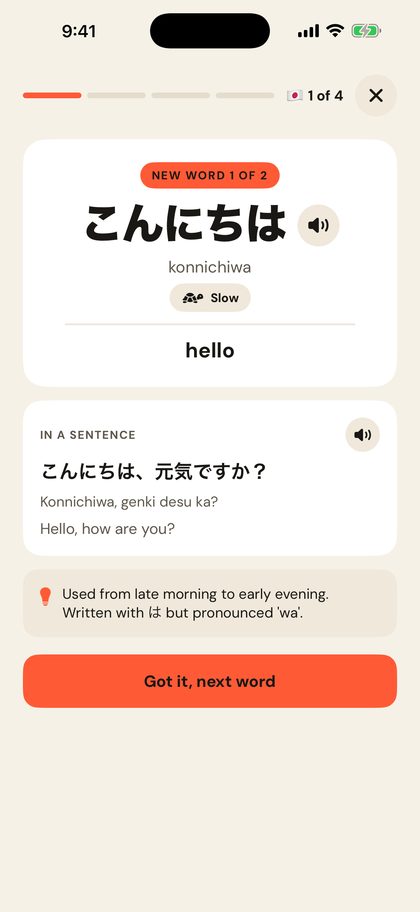
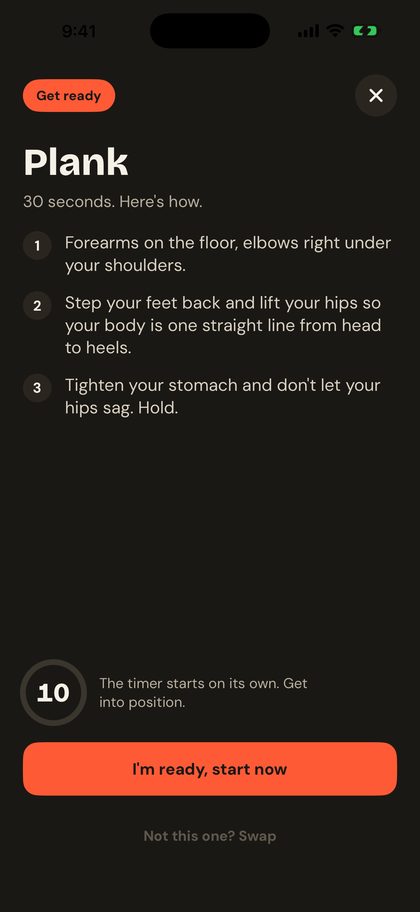
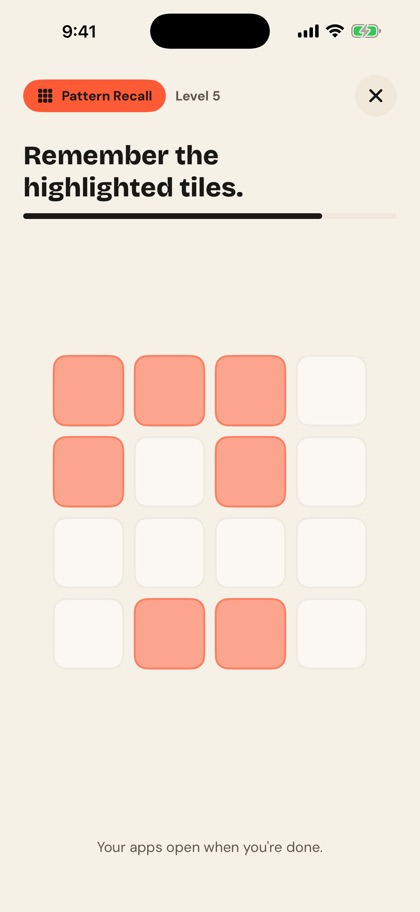
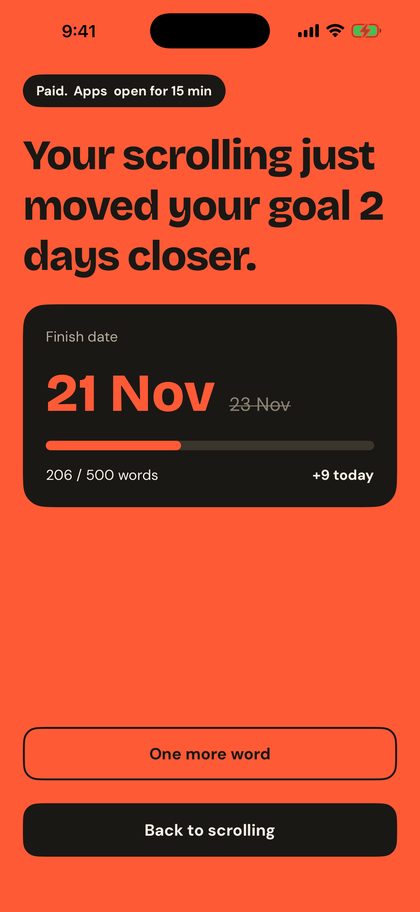
Before a blocked app opens, a 30-second step: two words of a language, a short move or a quick memory game. Then the app stays open for the 15 to 60 minutes you chose. Three skips a day for when you really can't.
Pause
one sec
A short pause, like a breathing animation, then you choose to go in or close. The only blocker here with a peer-reviewed study behind it.
Wait
ScreenZen
A wait before each open that can grow every time, plus open limits and schedules. Free, supported by tips.
Friction suits people who don't need a lockout, just a moment to notice. Most opens are habit, and a step at the door is enough to turn a lot of them back. For more apps in this group, see app blockers that make you do something before opening apps, or Opal vs one sec vs ScreenZen vs Sorry Scroll side by side.
Hard blocking: locked until the timer ends
Sessions
Freedom
Block sessions and schedules across phone and computer at once. Locked Mode stops you ending a session early.
Schedules
AppBlock
Schedules and limits for apps and websites. Strict Mode makes blocks much harder to undo, with options like a cooldown or someone else's approval.
Sessions
Opal
Sessions, schedules and limits. Its Pro Hard Mode is built so you can't switch Opal off mid-session.
Hard blocks suit people who know they'll tap through any pause in the moment, and work best on a schedule (work hours, bedtime) so there's nothing to decide. The trade-off: a strict block is in the way when you genuinely need the app, and a block you resent is one you'll eventually uninstall.
Feature removal: the feed goes, messages stay
Android
Android: one sec, ScreenZen, AppBlock
Block the Reels or Shorts screen inside the real Instagram or YouTube app. DMs, search and your profile keep working.
iPhone
iPhone: Dull, Sociano
Use Instagram, YouTube and others through the app's own browser with Reels, Shorts and feeds removed; posts from people you follow, Stories and DMs stay.
Feature removal suits people whose problem is short-form video, not the app. Step-by-step: block Instagram Reels but keep your messages, and block or limit YouTube Shorts (YouTube also has its own Shorts feed limit, which can be set to zero).
Side by side
US prices from each app's own pricing page or App Store listing, checked on 23 November 2026. Prices change and vary by country.
| App | Block type | Platforms | Free plan | Paid | Override |
|---|---|---|---|---|---|
| Sorry Scroll | Friction: a 30-second goal step | iPhone, Android | Yes: 1 app, 3 skips a day | $39.99/yr (about 77¢ a week) or $4.99/wk | 3 skips a day; then pay a step or wait |
| one sec | Friction: a pause | iPhone, Android, browser, Mac | Yes: 1 app | $19.99/yr; $99.99 lifetime | Always lets you through after the pause; full blocks on a schedule |
| ScreenZen | Friction: a growing wait | iPhone, Android, Mac, Windows | Everything; tips optional | Free | Optional block after open limits |
| Freedom | Hard block: sessions | iPhone, Android, Mac, Windows, Chromebook | Yes ($0 plan) | $8.99/mo or $3.33/mo billed yearly; lifetime option | Locked Mode (Premium) |
| AppBlock | Hard block: schedules and limits | iPhone, Android, browser | Not stated | Premium from $29.99/yr on the App Store | Strict Mode |
| Opal | Hard block: sessions and schedules | iPhone, Android, Mac | Yes: 3 rules | $99.99/yr; $399 lifetime | Hard Mode (Pro) |
| Dull | Feature removal, in its own browser | iPhone | 7-day trial | $3.99/mo or $29.99/yr; $59.99 lifetime | Hard Block can lock the real apps |
| Sociano | Feature removal, in its own browser | iPhone | Not stated | $39.99/yr | Optional Screen Time lock on the real apps |
| Screen Time / Digital Wellbeing | Daily time limits | Built in | Free | Free | Easy: change it in Settings |
AppBlock and Freedom don't spell out their free plans on the pages we checked; open the app to see what's included before you pay. Sorry Scroll's plans are on the Sorry Scroll pricing page.
What's already on your phone
Before you install anything, your phone already has a baseline:
Built in
iPhone: Screen Time
Set daily allowances for categories like Social, and schedules for downtime: on iOS 27 these are Time Allowances and Schedules. On your own phone you can change them in Settings in seconds, unless someone else holds the Screen Time passcode.
Built in
Android: Digital Wellbeing
App timers close the app and grey its icon when time's up (Android Help). Bedtime mode and Focus mode pause apps on a schedule. You can raise or remove a timer any time.
Both kick in after you've used up the time, and both are easy to wave away on your own phone. That's fine if you just want awareness. If a limit keeps getting ignored, that's the sign to add a step or a lock at the moment you open the app instead.
Which one, by situation
| If… | Try |
|---|---|
| You want to keep using the apps, just less, and get something back | Sorry Scroll: every open costs 30 seconds of a language, a move or a memory game. |
| You want a moment to notice, free | ScreenZen's wait, or one sec's pause for one app. |
| You tap through every pause | Freedom, AppBlock Strict Mode or Opal's Hard Mode, ideally on a schedule. |
| It's only Reels or Shorts, and your friends are in the DMs | Android: one sec, ScreenZen or AppBlock. iPhone: Dull or Sociano, or YouTube's Shorts feed limit set to zero. |
| Mostly at work or at night | A schedule: Screen Time Downtime, Digital Wellbeing Bedtime mode, or any blocker's schedule, so there's nothing to decide in the moment. |
| The problem is your laptop | Cold Turkey (Windows, macOS) or Freedom across devices. |
| You already use Duolingo | It doesn't block other apps. See Duolingo alternatives that block social media. |
Why Sorry Scroll
Every blocker on this page makes you give something up at the door: time, access, or the feed. Sorry Scroll is the one that gives you something back for it. Each open you pay for adds to a goal you picked: 500 words of a language, 500 active minutes, or 300 memory workouts. You never have to set aside time for it: the scrolling you were going to do anyway pays for it.
Good to know
- It covers whole apps, not one screen inside them, on both iPhone and Android. If Reels is the only problem, a feature-removal tool fits better.
- It isn't a lockout. Three skips a day, reset each day, let you through without a step; after that, it's a step or nothing.
- It's new: no App Store ratings yet, and no published study of its own. The case for a step at the moment you open an app comes from a 2023 PNAS study of one sec, where a 10-second pause cut actual opens by 57% over six weeks.
- Setup: on iPhone, one Screen Time permission prompt from Apple; on Android, Usage Access and Display over other apps. Which apps you block stays on your phone. More in how Sorry Scroll works.
Sorry Scroll
Keep your apps. Make each open count.
Sorry Scroll puts a 30-second step in front of the apps you choose: two words of a language, a quick move or a memory game. Your accounts and messages stay exactly where they are.
Free for one app with 3 skips a day. Pro covers every app for $39.99 a year (about 77¢ a week) after a 3-day free trial, or $4.99 a week. iPhone and Android.
Questions
Can I block social media without deleting my account?
Yes. Blocking the app, or even uninstalling it, doesn't touch your account. A blocker keeps the app installed and signed in and stands between you and it.
Does blocking an app delete my messages?
No. Your messages live on the company's servers. When the block lifts, or when you open the app on a computer, they're all there.
Is there a free app to block social media on iPhone?
Screen Time is built in and free. ScreenZen is free for every app, and Sorry Scroll and one sec are free for one app.
Is there a free app to block social media on Android?
Digital Wellbeing is built in. ScreenZen is free, and Sorry Scroll and one sec are free for one app.
What is the difference between Accessibility and Usage Access on Android?
Usage Access tells an app which app is open and for how long. Accessibility lets it read what's on screen inside other apps, which is how Reels-only blocking works. Accessibility is the much broader permission.
Can I block only Reels or Shorts and keep messages?
On Android, yes: one sec, ScreenZen and AppBlock can block just those screens in the real apps. On iPhone, no app can change Instagram's own app; Dull and Sociano instead show Instagram and YouTube in their own browser without Reels and Shorts.
What is the best way to stop scrolling without uninstalling apps?
Put something in front of the moment you open the app: a pause, a wait, or a short task like Sorry Scroll's 30-second step. Add a schedule for work hours or bedtime so you don't have to decide each time.
Does Apple Screen Time block apps well enough?
For a daily cap, yes. But you can change your own limits in Settings, so it works best if someone else holds the Screen Time passcode.
Sources
Every fact on this page comes from these official pages, checked on 23 November 2026.
- one sec on Google Play
- ScreenZen privacy policy (Android Accessibility use)
- Freedom pricing
- AppBlock website (Strict Mode)
- Opal pricing
- Dull on the App Store
- Sociano website
- Cold Turkey pricing and supported systems
- Apple developer: ShieldSettings
- Apple Support: Schedules and Time Allowances (iOS 27)
- Android Help: Digital Wellbeing app timers
- Android developers: AccessibilityService
- Google Play policy: Accessibility API disclosure
- Android developers: UsageStatsManager (Usage Access)
- Grüning, Riedel & Lorenz-Spreen (2023), PNAS
- Sorry Scroll privacy policy